
Product
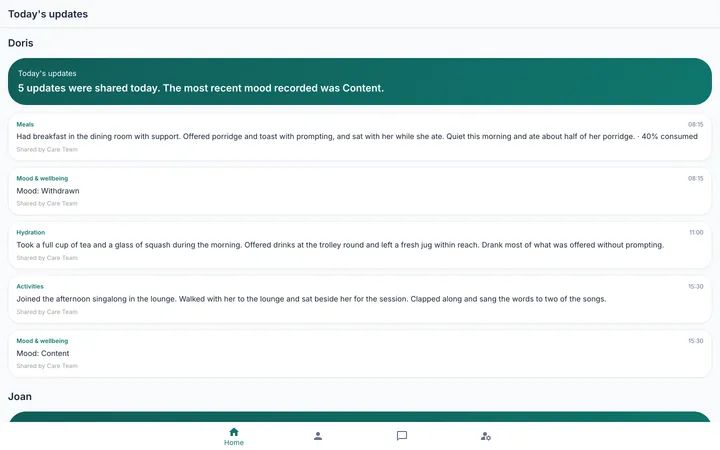
What the family sees is what the home chooses to share.
A relative signs in with a password and a code sent to their email, sees the day's updates for their resident and sends messages to the care team. Staff decide, section by section, what each relative may see.
Consent, section by section
There are seven sections, with a default for every relative and an override per person. An emergency switch hides everything at once, with the consent basis and a best interests note recorded.
The feed, and the profile
The day's updates include the care logs a member of staff has chosen to share, beneath a note from the care team. The profile shows the medical block only where consent allows.
Invitations, not open sign-up
Staff invite a named relative, attach the proof of relationship and approve the request. Under-18s cannot be given access, and ending access requires a reason and signs the relative out immediately.
Messages
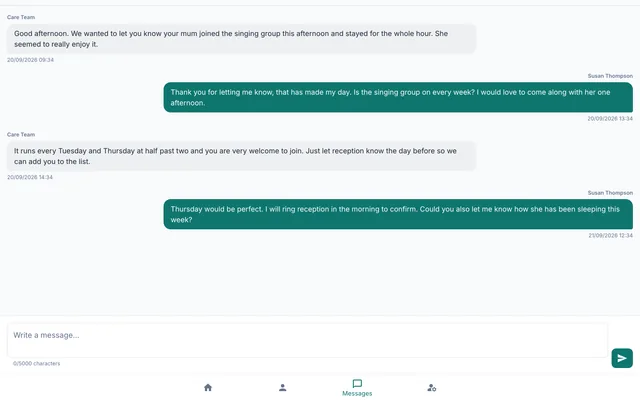
A conversation with the care team
A relative starts a conversation or replies. Staff answer from one inbox for the whole home, with unread, needs response and overdue views. The relative sees the care team, never a named member of staff.
- Trusted devices remembered for ninety days
- A PDF of the profile with the last thirty days of updates, on request
- Nothing clinical is ever put in a family export
For the home
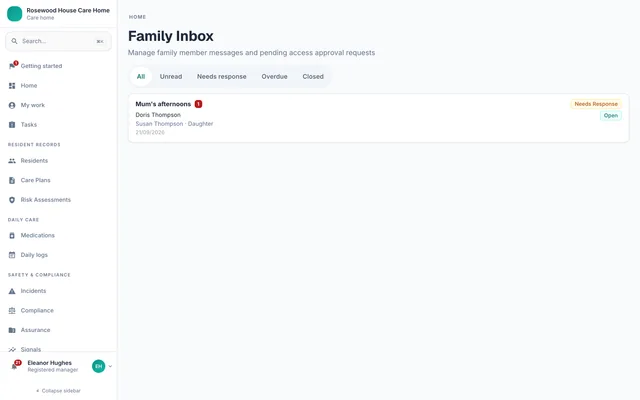
One inbox, one control panel
Every family conversation in the home appears in one inbox. On the resident record, the Family access tab holds the invitations, the live grants, the sharing settings and today's note.
- Suspend, reinstate or revoke access with a reason
- Retract a shared update
- Export requests logged, and revocable
Works with Residents, Daily logs, Compliance.
See it on your own terms
Book a demo and we will show you the modules that matter to your home.